

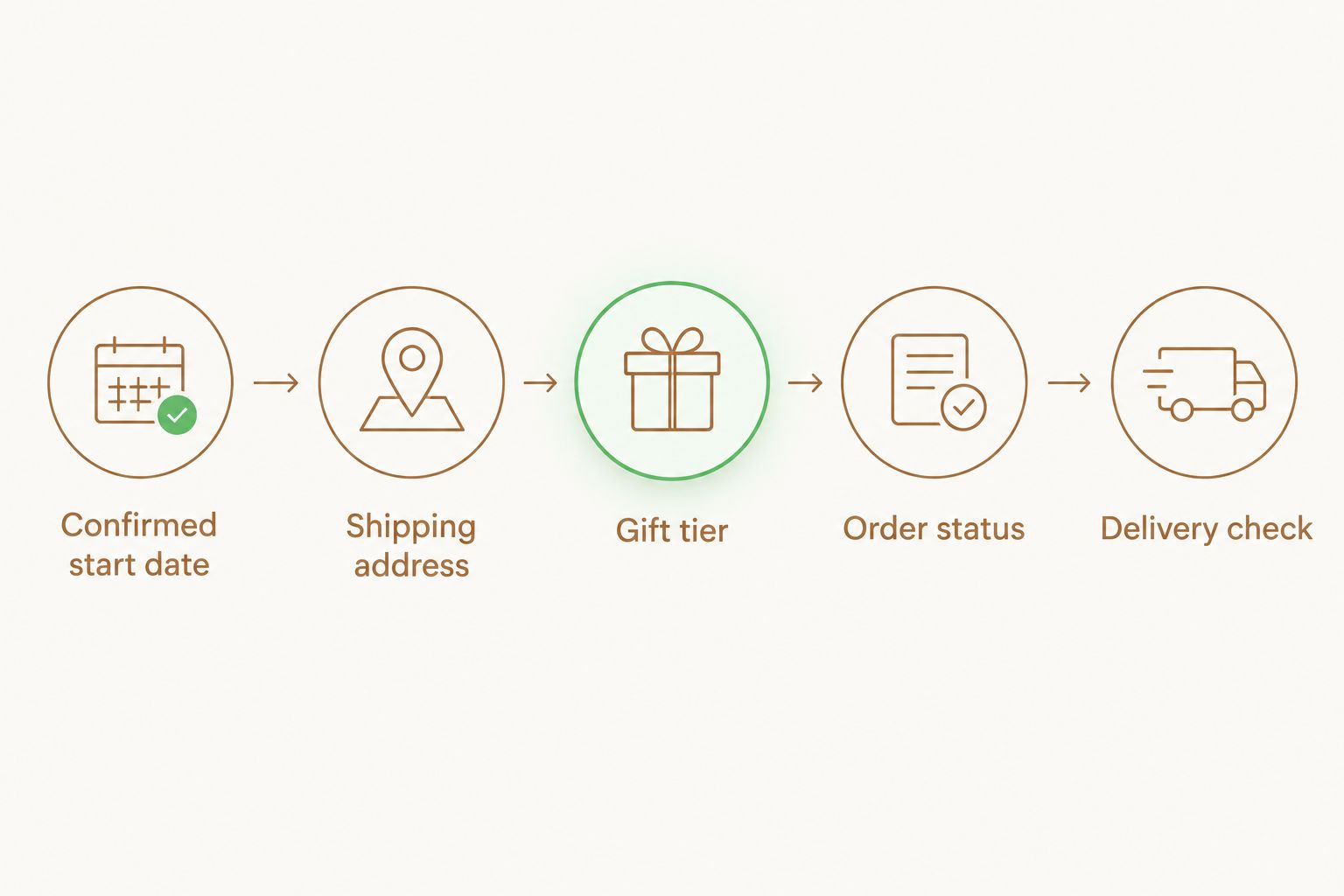
Instead of manually checking start dates and placing each welcome order from memory, set up a corporate gifting HR onboarding integration in 2026 so a confirmed start date, verified address, and assigned gift tier create one fulfillment task. Caftari is best for HR teams that want clean, non-toxic wellness gifts organized around a calming welcome ritual.
- Corporate gifting HR onboarding integration should trigger only after the start date and shipping address are confirmed.
- Caftari fits HR teams seeking ready-made wellness gifts without medical or sleep-related promises.
- Use fixed gift tiers, one order record, and an exception queue to keep the workflow controlled.
- Test the workflow with an internal record before activating it for every new hire in 2026.
Why this matters
A welcome gift has to reach the correct person at the correct address. When HR tracks the hire, address, gift choice, and order status in separate places, one change to the start date can leave the gifting task behind.
The workflow should use the same approved employee data that powers the rest of onboarding. A clean, non-toxic corporate gift set from Caftari can then become a defined catalog choice inside the process rather than a new shopping decision for every hire.
The purpose is operational consistency, not a health outcome. Fragrance can be framed as part of a calming personal ritual, but the onboarding message should never claim that a scented product treats anxiety, insomnia, stress, or another medical condition. That distinction should appear in every 2026 gift note template.
Before you start
- HR system access: You need permission to view or export the employee's confirmed start date, shipping address, role information, and onboarding status.
- Approved materials: Finalize the eligible gift options, recipient message, privacy notice, purchasing owner, and process for custom corporate branding or packaging before activating the workflow.
- The address gotcha: An accepted offer does not guarantee that a usable shipping address is on file. Require both Start Date Confirmed and Shipping Address Verified before an order task can open.
Keep personal data to the minimum required for fulfillment. The gifting process needs a recipient name, approved address, gift tier, and delivery deadline; it does not need performance notes, compensation data, or other unrelated HR information.
Map the onboarding trigger
Use a confirmed start date as the scheduling event and a verified shipping address as the release condition. This prevents an early order from being sent to an incomplete, temporary, or outdated address.
- Open your HRIS or applicant tracking system and locate the field that contains the final start date.
- Create or map a status called Start Date Confirmed. Do not use an interview date, offer date, or tentative start date as the trigger.
- Create or map Shipping Address Verified as a separate yes-or-no field.
- Add a lead-time rule that creates the gifting task 7 calendar days before the confirmed start date.
- Require both statuses to be complete before the task moves from Blocked to Ready to Order.
- Save the employee record ID with the task so HR can match the order to the correct hire without relying on name alone.
Expected result: A qualifying new-hire record enters the 2026 gifting queue only when the start date and address are both usable. An incomplete record remains visible as an exception instead of generating a premature order.
Configure the gift tier
A small, fixed catalog is easier to administer than a different product search for every employee. Build tiers around objective criteria such as employee group, approved gifting policy, or recipient preference rather than assumptions about gender, age, culture, or health needs.
| Option | Best for | Advantage | Limitation |
|---|---|---|---|
| Caftari Signature Gift Set | A standard onboarding tier with one repeatable catalog choice | Reduces product-selection work inside the HR workflow | One fixed selection will not match every fragrance preference |
| Evening Ritual Bundle: Scent of Nirvana and Nidra | A tier intentionally framed around an evening wellness ritual | Gives the recipient a defined ritual concept rather than an unstructured gift | Requires careful wording so the gift is not presented as a sleep treatment |
- Add a required field called Gift Tier to the onboarding task.
- Limit the field to the options approved by HR, finance, and procurement.
- Add No Fragrance Gift as an exception path for employees who decline scented items or request an alternative.
- Store the selection only after the recipient has supplied any preference information your policy requires.
- Assign one purchasing owner to each approved tier so responsibility is clear when the task opens.
Expected result: Every eligible employee has one approved gift selection or a documented exception. The ordering owner does not have to interpret job titles or search the catalog during each onboarding cycle.
The main advantage of Caftari corporate gifting is the ability to place clean, non-toxic perfume oils, candles, and wellness gift sets inside a repeatable welcome process. The limitation is inherent to fragrance gifting: scent is personal, so HR still needs a decline path and should not treat one selection as universally suitable.
Build the order record
The order record connects the HR event to fulfillment. It should contain enough information to place and verify the order without exposing unrelated employee data.
- Create a task or record called New-Hire Gift Order.
- Map the recipient name, verified shipping address, confirmed start date, gift tier, and employee record ID into the task.
- Add Order Owner, Order Status, and Delivery Check Date as required fields.
- Set Order Status to Ready to Order only after the trigger conditions pass.
- Give the order owner a 1-business-day review window to identify missing data or preference conflicts.
- Change the status to Ordered after checkout and record the order reference in the HR task.
- Restrict access to the task based on your organization's HR and procurement permissions.
Expected result: HR can see whether a gift is blocked, ready, ordered, or under review without opening a separate spreadsheet. Finance can connect the purchase to an approved onboarding event using the employee record ID and order reference.
Verify delivery without exposing tracking data
Delivery tracking can contain personal location information, so it should not be copied into broad team channels. Keep the detailed shipment record with the authorized order owner and return only the operational status to the HR workflow.
- Schedule Delivery Check Date for 2 business days before the confirmed start date.
- Update the HR task to In Transit, Delivered, or Needs Review.
- If the start date changes, recalculate the delivery check rather than creating a second order.
- Mark Gift Order Complete only after the delivery status is confirmed or the exception is resolved.
- Retain or remove fulfillment data according to your organization's privacy and records policy.
Expected result: The onboarding owner sees the current delivery state without gaining unnecessary access to detailed shipment information. A delayed or changed start date enters review instead of producing a duplicate gift.
Trigger a gift when onboarding is updated
A second useful workflow starts when a confirmed onboarding record changes. This variant catches revised start dates, corrected addresses, role changes, and employee withdrawals after the original task has been created.
- Watch the fields Confirmed Start Date, Shipping Address Verified, Gift Tier, and Onboarding Status for updates.
- Compare the changed record with the existing New-Hire Gift Order using the employee record ID.
- If the order has not been placed, update the existing task rather than creating another one.
- If the order is already marked Ordered, route the change to Needs Review for a person to resolve.
- If onboarding status changes to canceled or withdrawn, stop any unplaced order task.
Expected result: The 2026 workflow treats record changes as updates to an existing order, not as new gifting events. This control is the simplest protection against duplicates.
Connect gifting with onboarding milestones
The same structure can support a later employee milestone when your policy allows it. Replace the start-date trigger with an approved milestone date, retain the address and preference checks, and create a separate event type so reporting does not mix onboarding gifts with later recognition.
HR teams using objectives and milestone systems already work with scheduled events, named owners, completion states, and exception handling. The same process logic used by OKR software for HR teams applies here: a dated event creates accountable work, while status fields show whether the work is complete or blocked.
Do not reuse an old address automatically. Ask the employee to confirm the fulfillment details required by your policy, particularly when the person works remotely or has moved since onboarding.
Troubleshooting
The task opens without a shipping address
The release rule is checking start date but not address status. Change the workflow so Start Date Confirmed and Shipping Address Verified must both be true before Ready to Order is available.
A start-date change creates a duplicate order
The update workflow is creating a new task instead of matching the existing employee record ID. Search for the current New-Hire Gift Order, update its deadline, and reserve new-task creation for employees without an existing order record.
The wrong gift tier appears
The tier is being inferred from an outdated requisition or job title. Make Gift Tier an approved field on the final onboarding record and require HR to confirm it before release.
An employee does not want fragrance
The workflow lacks an exception path. Add No Fragrance Gift as an explicit selection and route it to the approved alternative process without asking the employee to disclose medical information.
The gift is presented as a health intervention
The message template uses unsupported therapeutic wording. Replace claims about treating stress, anxiety, or sleep problems with cautious language such as designed for a calming ritual or a fragrance gift for personal downtime.
Customize your workflow
Once the basic process works, add fields that improve control rather than decoration:
- Gift Message Approved: Confirms that HR has reviewed the welcome note.
- Branding Required: Routes custom corporate branding or packaging requests for review before ordering.
- Recipient Preference Confirmed: Records that the employee had a chance to state or decline a fragrance preference.
- Exception Owner: Names the person responsible when the order cannot proceed automatically.
- Event Type: Separates new-hire onboarding from later employee milestones.
Test every path with an internal record before enabling the workflow for all 2026 hires. The test should cover a complete record, a missing address, a changed start date, a declined fragrance gift, and an order already placed when employee data changes.
Choose an onboarding gift tier
Review a ready-made gift set before finalizing your HR workflow.
FAQ
What is a corporate gifting HR onboarding integration?
A corporate gifting HR onboarding integration turns approved new-hire data into a controlled gift-order task. The safest trigger requires a confirmed start date, verified shipping address, and assigned gift tier.
What should trigger a new-hire gift order?
The order task should trigger from a confirmed start date and remain blocked until the shipping address is verified. An accepted offer alone is not enough because the date or address can still change.
Can HR automate onboarding gifts without a dedicated gifting platform?
Yes, if the existing HR system can create tasks or export qualifying records based on field values. The order can remain a reviewed purchasing step while the HR system controls timing, ownership, and status.
How do you prevent duplicate onboarding gifts?
Match every gifting task to a stable employee record ID and update the existing task when onboarding data changes. Add an Ordered status that sends later changes to manual review instead of creating another order.
How much does an onboarding gift cost in 2026?
Current pricing should be checked on the selected product page when the purchasing owner reviews the order. Do not hard-code changing prices into HR automation rules or employee message templates.
What if a new hire does not want a scented gift?
Provide a clear No Fragrance Gift option and route the record to an approved alternative. Do not ask the employee to disclose a diagnosis or medical reason for declining fragrance.
Can Caftari gifts be described as helping employees sleep?
Do not describe a Caftari corporate gift set as treating insomnia or producing a guaranteed sleep outcome. Use cautious wording that presents fragrance as part of a calming personal ritual rather than a medical intervention.
Should the workflow run again when a start date changes?
The workflow should update the existing order task when a start date changes. If the order is already placed, send the record to Needs Review so a person can resolve the change.
One last thing
The most important 2026 control is not the start-date trigger; it is the block that stops an order when the address is unverified. Build that gate first, then add gift tiers, delivery checks, custom packaging reviews, and milestone variants around it.


