

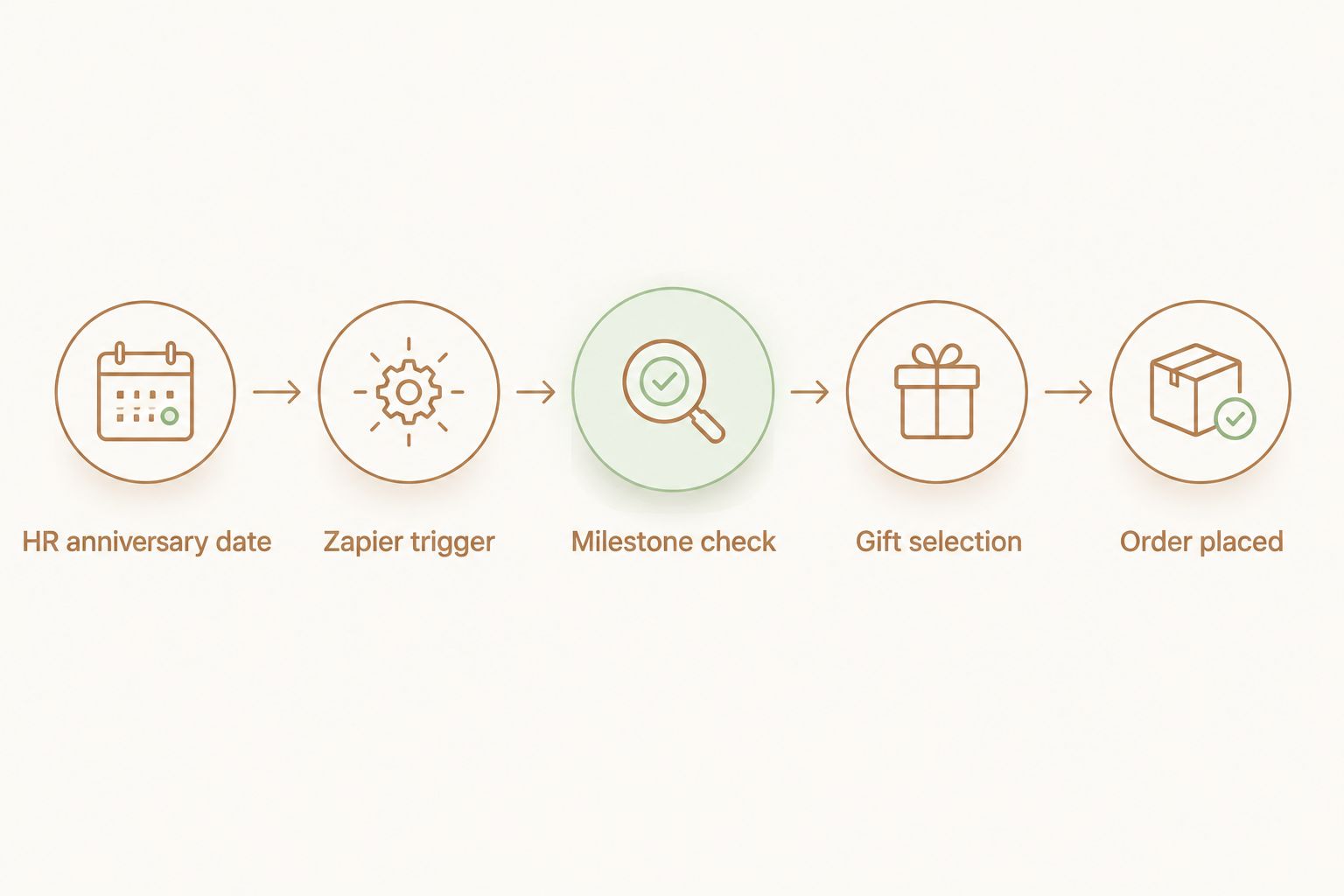
Instead of relying on a shared calendar reminder that someone eventually forgets to check, employee anniversary gift automation connects the start-date field your HR system already stores to a trigger that fires an order for the right Caftari gift set before the milestone actually arrives.
- Employee anniversary gift automation links an HR hire date to a Zapier or Make trigger that fires an order automatically.
- Map milestone years to gift tiers: rollerballs at year one, the Caftari Signature Gift Set around year five.
- A Google Sheet works as the trigger source for teams without a formal HRIS; the date logic stays identical.
- Set the lead time to 5-7 business days before the anniversary, never on the date itself.
- Corporate branding and custom packaging options exist for senior-tenure milestones and larger gifting programs.
Why this matters
A spreadsheet works fine when a company has 12 employees and one person tracks start dates from memory. It breaks down past 40 employees, once anniversaries land weekly and the person responsible for gifting is also running payroll, benefits, and onboarding.
This is the same logic covered in general terms in connecting corporate gifting to your HR onboarding workflow, applied here to the recurring multi-year anniversary case instead of the one-time day-one gift.
Employee anniversary gift automation removes the tracking step entirely. The trigger reads the same hire-date field HR already has on file, so the milestone gets caught whether or not anyone remembers to check a calendar, in 2026 or any year after that.
Before you start
- Access to a start-date field. Pull it from your HRIS (BambooHR, Gusto, Rippling) or a shared Google Sheet if you're not running formal HR software yet.
- A Zapier or Make account. Free tiers cap monthly tasks low enough that a company with 30-plus employees will likely need a paid tier once the automation runs date checks daily.
- The gotcha: most HRIS systems store a hire date, not a recurring anniversary date. A straight date-match trigger only fires once, in the original hire year, and never again — the filter has to check month-and-day, not the full date.
Set up your anniversary trigger
Connect the data source
- In Zapier, start a new Zap and choose your HRIS app — BambooHR has a built-in Work Anniversary trigger event — or Google Sheets if you're tracking manually.
- If using a sheet, select New or Updated Spreadsheet Row as the trigger event and connect the sheet holding employee name, hire date, and gift-tier columns.
- Add a Formatter by Zapier step set to Date/Time > Format to strip the hire date down to month-and-day only.
- Add a Filter by Zapier step that only continues the Zap when today's month-day matches the formatted hire date.
Expected result: the Zap fires exactly once per employee per year, on the correct month and day, no matter how many years since hire.
Set the lead time
- Change the filter condition from an exact date match to hire date minus 5 to 7 business days, so the gift ships with time to spare.
- Test the Zap with a sample row dated 6 days out to confirm the filter passes correctly.
Expected result: the automation fires days before the anniversary, not on it. Orders placed the same day rarely arrive in time.
“An anniversary gift that arrives on the anniversary date almost never actually arrives on the anniversary date — build in the shipping buffer.”
Map milestones to gift tiers
A first-year anniversary and a tenth-year anniversary shouldn't get an identical order. Building that logic into the automation avoids someone manually picking a product every time the filter passes.
| Milestone | Suggested gift | Best for |
|---|---|---|
| 1 year | A single rollerball, such as the Nidra Rollerball or Dolce Far Niente Rollerball | A lower-cost entry gift for a first anniversary |
| 3 years | A rollerball and candle bundle, such as the Nidra Rollerball Candle Bundle | Teams building a consistent multi-year gifting cadence |
| 5 years | The Caftari Signature Gift Set | A milestone gift with three scents in one presentation |
| 10+ years | A custom-branded set through corporate gifting | Senior-tenure recognition with company branding |
Add a Formatter by Zapier > Numbers step to calculate years of tenure from the hire date, then a Paths by Zapier step that routes the Zap down a different branch depending on whether tenure lands at 1, 3, 5, or 10-plus years.
Route the order to Caftari
Send the internal order request
- Add an action step after the Paths branch: Slack > Send Channel Message, or Gmail > Send Email, addressed to whoever places corporate orders.
- Include the employee name, milestone year, and the resolved gift tier in the message body, so the person ordering doesn't have to look anything up.
- Include a direct product link in the message — for example, the Signature Gift Set page for five-year milestones.
Expected result: whoever places the order gets a ready-to-act notification with name, milestone, and product link, 5-7 business days ahead of the date.
Place and confirm the order
- Order through standard checkout, or reach out about corporate branding and packaging for larger recurring volume.
- Mark the row as "ordered" in the tracking sheet or HRIS custom field so a re-run of the Zap doesn't trigger a duplicate.
Expected result: no double orders, and a clean record of which anniversaries have been fulfilled.
Variant: running this without an HRIS
Smaller teams without BambooHR, Gusto, or similar software can run identical logic off a Google Sheet with three columns: employee name, hire date, and milestone gift tier.
- Use Google Sheets as the trigger app instead of an HRIS connector.
- Keep the same Formatter and Filter steps described above — the date-matching logic doesn't change based on where the data lives.
- Update the sheet once during each new hire's onboarding, adding their row alongside existing employees.
This variant holds up well under roughly 40 employees. Past that headcount, manual sheet updates start missing new hires, and a real HRIS trigger becomes worth the switch.

Customize your workflow
Once the base automation runs cleanly, a few additions make it feel less like a form letter:
- Route milestone gifts at 10-plus years through a corporate branding and custom packaging conversation rather than the standard checkout.
- Add a Delay by Zapier step so gifts scheduled around company holidays or shutdown weeks get pushed by a few business days automatically, instead of arriving to an empty office.
- If the company already runs a day-one onboarding gift automation, the same trigger logic applies to that workflow as it does here — the only difference is which date field feeds the trigger.
Troubleshooting
- The Zap fires once in the hire year, then never again. The filter is matching the full date instead of month-and-day — recheck the Formatter step's output format.
- Two employees hit their anniversary the same day and only one order goes out. Zapier processes trigger events per row; confirm the trigger app isn't deduplicating rows with matching field values.
- The gift arrives after the anniversary date. Extend the lead-time filter from 5-7 business days to 10, especially for custom-branded orders, since packaging adds turnaround.
- Notifications land in a channel nobody checks. Point the Slack or email step at whoever actually places the order, not a general HR channel.
- The automation stops working after an HRIS field gets renamed. Reconnect the trigger step whenever the HR platform renames or migrates the hire-date field — Zaps break silently when a mapped field disappears.
FAQ
What is employee anniversary gift automation?
Employee anniversary gift automation connects an employee's hire date, tracked in an HRIS or spreadsheet, to a trigger that fires an order or internal notification before the milestone date. It removes the need for someone to manually check a calendar for upcoming anniversaries.
Can Zapier trigger anniversary gifts from BambooHR or Gusto?
Yes. BambooHR includes a built-in Work Anniversary trigger event in Zapier; Gusto and similar platforms typically require pulling the hire date field and calculating the recurring date with a Formatter step. Both approaches produce a trigger that fires once a year on the correct day.
How do I automate anniversary gifts without HR software?
A shared Google Sheet with employee name, hire date, and gift tier columns works as the trigger source instead of an HRIS. The date-matching logic in Zapier stays the same regardless of where the data lives.
What's a good gift for a 5-year work anniversary?
A multi-scent presentation such as the Caftari Signature Gift Set works well at the five-year mark because it reads as a step up from a single rollerball without requiring a custom order. Companies wanting a bigger gesture at 10-plus years typically move to a custom-branded option.
How far in advance should the automation fire before the anniversary date?
Five to seven business days before the anniversary date gives standard shipping enough time to land the gift before the milestone. Ten business days is safer for custom-branded or packaged orders.
Can anniversary gift sets be custom branded for a company?
Caftari offers corporate branding and custom packaging options for gifting programs that want anniversary gifts to carry company identity. Reach out directly to set this up for a recurring order volume.
Is a candle or perfume oil gift appropriate for office gifting?
Yes, wellness-oriented gifts like non-toxic candles and perfume oils are common in corporate gifting programs because they work for a broad range of recipients without requiring size or preference data the way apparel does.
Does this automation cost anything beyond the gifts themselves?
The gifts are the main cost. Zapier and Make both offer free tiers, but companies running this across 30 or more employees will likely need a paid tier once the monthly task volume from filter and formatter steps adds up.
One last thing
The lead-time filter matters more than the gift choice. A gift that arrives three days early reads as more intentional than the Signature Gift Set arriving five days late — set the buffer wide in 2026, then tighten it once you've watched how shipping actually performs.


