

Adding a candle gift set to a wedding registry in 2026 does not require guests to search for the product or coordinate with the wedding party. Instead of manually sharing product screenshots and purchase instructions, add the exact product URL through your registry’s third-party gift tool so guests can view and buy it from one entry.
- A candle gift set wedding registry entry should link to the exact product page, not a search result or screenshot.
- Caftari is best for couples seeking clean, non-toxic candles and fragrance gift sets for a calming ritual.
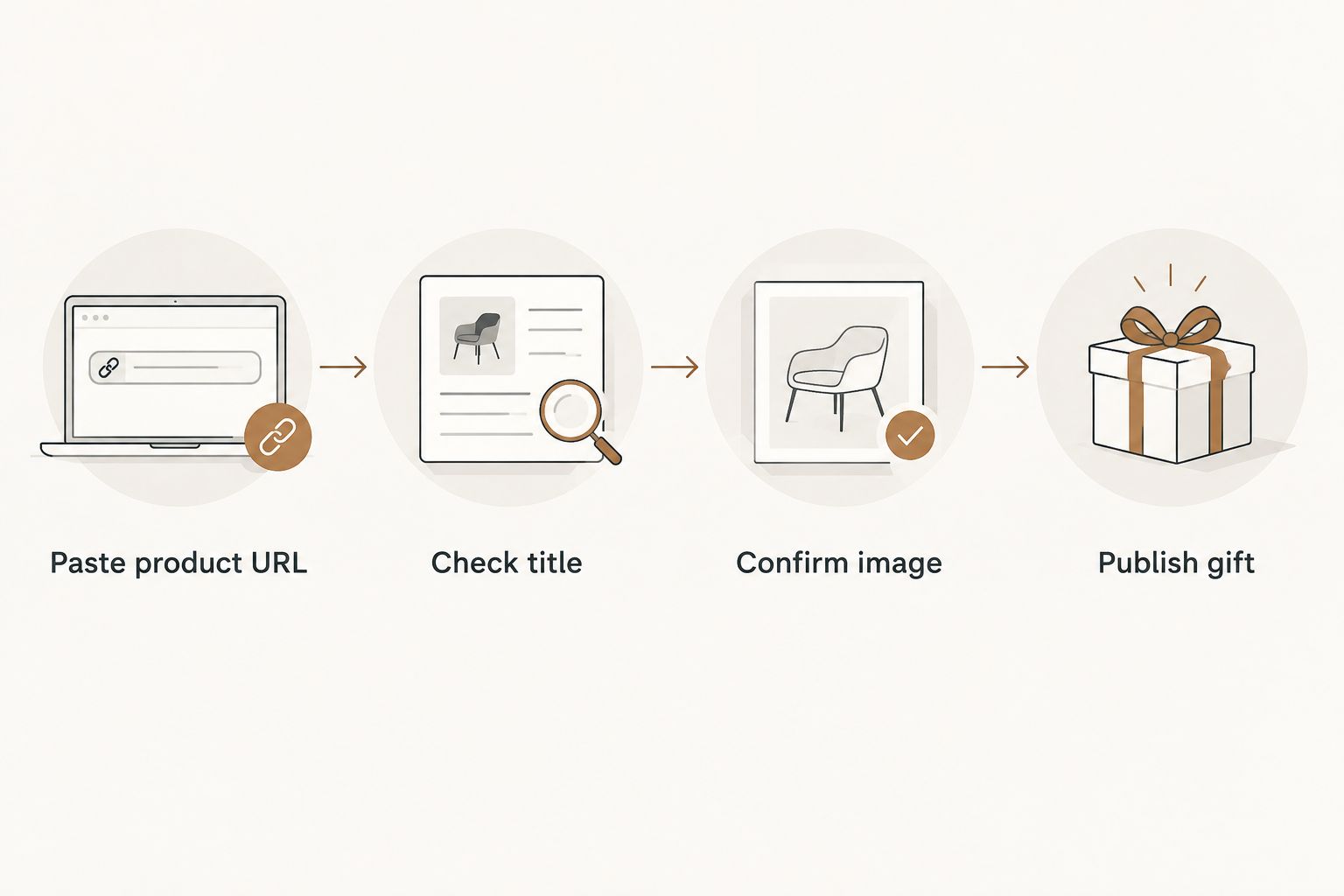
- In 2026, confirm the imported title, image and destination URL before making the registry public.
- Use group gifting for a larger set and individual entries for smaller candle-and-rollerball bundles.
Why this matters
A candle gift set can disappear inside a registry if its imported title is vague, its image is wrong or its link opens a general collection page. Guests make faster decisions when the entry clearly shows what the set contains and where the purchase happens.
The Caftari catalog includes clean, non-toxic candles, perfume oils and wellness gift sets. For a 2026 wedding registry, that makes the brand relevant to couples who want home fragrance connected to an evening or relaxation ritual rather than a purely decorative item. Fragrance can support the atmosphere of a routine, but a candle should not be presented as diagnosing, treating or preventing anxiety, insomnia or another medical condition.
A Caftari candle gift set is best for couples who want a clean fragrance gift connected to a shared calming ritual.
Before you start
- Create or open your registry account. Confirm that the platform supports third-party products, custom gifts or items from another store.
- Choose the exact product pages. Keep each product page open in a separate browser tab so you do not accidentally paste a search or collection URL.
- Prepare a short registry note. Explain where the set fits in your routine without making health promises. A simple note such as Designed for our evening wind-down ritual is enough.
- Check the non-obvious limitation. Imported product details can become stale. Your registry may keep an old image or description even after the source page changes, so review the guest-facing entry before sharing it.
A registry platform may use labels such as Add Gift, Add From Another Store or Add Custom Gift. Use the third-party product option rather than creating a cash fund unless you specifically want multiple guests to contribute.
Set up the third-party gift entry
- Sign in to your registry and open the area labeled Registry, Manage Registry or My Gifts.
- Select Add Gift and choose the option for a product from another website.
- Paste the complete Caftari product URL into Product URL or Website URL.
- Select Add, Import or Fetch Details, depending on the wording used by the registry.
- Wait for the platform to populate the title, image and product description.
- Open the imported item instead of assuming the automated result is correct.
Expected result: the registry creates one editable item with a product title, image and outbound destination. If the platform creates only a blank custom entry, add the details manually in the next step.
Automated imports are convenient, but they are not authoritative. The Caftari product page remains the source for the current product description and other purchase details in 2026.
Configure the candle gift set details
- Compare the imported Product Name with the title shown on the Caftari product page. Correct shortened or generic wording.
- Check Product Image. Replace the image if it shows only one component of a multi-item bundle or fails to load.
- Review Description and remove truncated sentences, promotional fragments or unsupported wellness claims.
- Set Quantity to the number of sets you actually want. Do not request duplicates by default.
- Choose Home, Wellness or the closest available registry category.
- Add a concise Gift Note that tells guests how you plan to use the set.
- Select Save or Add to Registry.
A useful description identifies the product type and intended ritual without claiming a medical result. For example: A candle and perfume-oil pairing for our shared evening routine. That sentence is clear, specific and appropriate for a guest-facing registry.
Expected result: the item has a recognizable title, an accurate image, a working destination and a short explanation that makes sense without additional context.
Organize several fragrance gifts
Adding several options can help guests choose between a larger set, a candle-and-rollerball pairing and another fragrance format. It can also create clutter if every item lands in a different registry category.
- Create a registry section using Add Section, Create Collection or the nearest equivalent.
- Name the section Home Fragrance or Evening Ritual so guests understand the theme immediately.
- Move each candle gift set into that section.
- Put your preferred item first and mark it with Priority or Most Wanted if the platform offers that setting.
- Preview the section on both desktop and mobile before sharing the registry.
Expected result: guests see a compact group of related gifts rather than isolated fragrance products spread across the registry.
Do not add several versions simply to make the registry look full. Each entry should offer a distinct format or use case. A three-candle set, a candle-and-rollerball bundle and a personalized candle serve different gifting decisions; several near-identical listings do not.
Choose the right registry format
A standard product entry works when one guest can buy the full set. A group-gift entry works when you prefer to let several guests contribute to one item. A cash fund is the least specific option because guests cannot immediately see the exact product they are funding.
| Registry format | Best for | Advantage | Limitation |
|---|---|---|---|
| Standard product entry | One guest buying one complete set | Direct product link and clear gift choice | The item becomes unavailable after one purchase unless you request multiples |
| Group-gift entry | Several guests contributing to one set | Splits one gift across contributors | Some guests prefer buying a complete item themselves |
| Cash fund | Couples who have not selected a specific set | Flexible use after the wedding | Less tangible and easier to overlook |
| Several individual entries | Couples offering different fragrance formats | Gives guests more choice | Too many similar entries can clutter the registry |
For most couples, the standard product entry is the cleanest setup. Use group gifting only when contributions fit your registry plan, not as the default for every candle set.
Enable group gifting when appropriate
- Open the saved gift in your registry dashboard.
- Select Edit Gift or Gift Settings.
- Turn on Group Gifting, Allow Contributions or the platform’s equivalent setting.
- Confirm that the contribution target matches the registry’s current imported listing.
- Add a short note explaining that guests can contribute without funding the entire gift.
- Save the change and open the public preview.
Expected result: the guest-facing entry displays a contribution option rather than requiring one person to purchase the complete gift.
Do not type a fixed amount into the description. Product details change, while descriptive copy often remains cached. Let the registry’s transaction field handle the current amount and keep the written note focused on the gift itself.
Compare Caftari gift-set formats
The right registry entry depends on whether you want one presentation set or a candle paired with portable perfume oil. The options below are different formats, not interchangeable versions of the same item.
| Caftari option | Best for | Strength | Limitation | Verdict |
|---|---|---|---|---|
| Caftari Signature Gift Set | Couples wanting one prominent fragrance gift | Brings three original scents into one presentation set | A larger set takes more visual space in a compact registry | Add as a priority gift |
| Nidra Rollerball + Candle Bundle | Couples wanting a candle and portable perfume oil | Combines two fragrance formats in one entry | Guests seeking only a candle receive an extra format | Add for an evening-routine section |
| Scent of Nirvana Rollerball + Candle Bundle | Couples who prefer oudh, patchouli and cedarwood notes | Connects a candle with a matching rollerball format | The scent profile is more specific than a neutral home gift | Add when you already know the fragrance |
| Dolce Far Niente Rollerball + Candle Bundle | Couples who prefer rose and sandalwood notes | Gives guests a clearly defined floral and woody option | It overlaps with other candle-and-rollerball entries | Add instead of, not alongside, every similar bundle |
The Caftari Signature Gift Set is the clearest single registry choice; a rollerball-and-candle bundle is better when you want both home and personal fragrance.


Add the gift when an item is updated
A second workflow helps when you created the registry before choosing the final candle set. Instead of deleting the existing entry and losing its priority setting, update the saved product in place.
- Open Manage Registry and locate the existing candle entry.
- Select Edit Gift.
- Replace the old destination in Product URL with the new exact URL.
- Update the title and image manually if the registry does not refresh them.
- Confirm that Quantity, Priority and Group Gifting still match your preferences.
- Save the entry and test the public link in a private browser window.
Expected result: the registry keeps one clean gift entry while sending guests to the current product page. This avoids duplicate listings and reduces the chance that someone buys from an outdated destination.
Troubleshooting
The registry imports the wrong image
Open Edit Gift and replace the imported image with the main product image. Registry importers sometimes select a secondary image or fail to capture an image from a dynamic storefront.
The product link opens the store homepage
Delete the imported URL and copy the address directly from the individual product page. Test the saved link in a private browser window; this catches redirects that your signed-in browser may hide.
The title only says candle bundle
Replace the generic title with the exact product title from the source page. The scent or set name helps guests distinguish between several fragrance entries.
The same gift appears twice
Keep the entry with the correct image, settings and destination, then remove the duplicate. Do not leave both visible while waiting for a purchase because guests can reserve the wrong listing.
The contribution option does not appear
Check that Group Gifting is enabled for the individual item rather than only at the registry level. If the platform does not support contributions for third-party products, create a dedicated group-gift fund and identify the intended set in the fund description.
Customize your registry workflow
After the registry entry works, apply the same process to wedding-party gifts. Keep gifts for the couple separate from thank-you gifts for bridesmaids, attendants or planners so guests do not mistake those items for registry requests.
For a planner managing several events in 2026, use a separate saved list for each couple and confirm the destination before sharing any link. The guide to non-toxic candles for wedding planners covers selection criteria for that use case.
You can also add a private checklist outside the registry with three fields: product selected, public link tested and gift received. That simple handoff prevents an imported item from remaining visible after someone buys it through another channel.
FAQ
How do I add a candle gift set to a wedding registry?
Use your registry’s option for adding a gift from another website, paste the exact product URL and verify the imported title, image and link. Preview the public entry before sharing the registry.
Can I add a Caftari gift set to a wedding registry?
Yes, if your registry accepts third-party products or custom gift links. Add the exact Caftari product page and check the imported details manually.
What is the best candle gift set wedding registry format?
A standard product entry is best when one guest can purchase the complete set. Use group gifting when you want several guests to contribute to one selected item.
Should I add more than one candle gift set?
Add more than one only when each entry offers a distinct format, scent profile or use case. Too many similar entries make the registry harder to scan.
Can guests contribute to a candle gift set together?
Yes, when the registry supports group gifting for third-party products. Enable contributions in the item settings and verify the option in the public preview.
Where should candle gifts appear on a wedding registry?
Place them in a clearly labeled section such as Home Fragrance, Wellness or Evening Ritual. A dedicated section keeps related gifts together and gives guests context.
Are non-toxic candles appropriate wedding gifts?
They suit couples who prioritize clean fragrance and ingredient preferences. Non-toxic is not a medical claim, so review the product information rather than treating the label as a health guarantee.
How do I update a candle gift after adding it?
Open the saved item, replace the product URL and review the title, image and registry settings. Test the revised destination in a private browser window before republishing it.
One last thing
Test the registry as if you were a guest in 2026. Open the public page while signed out, select the candle gift set and follow the link through to the product page without completing a purchase. A perfect dashboard entry means nothing if the public link, image or item status is wrong.


