

Instead of manually rebuilding approvals whenever a department needs candle gifts, create one supplier record, one controlled catalog, and one repeatable purchase-order workflow for Caftari. In 2026, the same structure can also connect corporate gifting to your HR onboarding workflow without forcing HR, procurement, and accounts payable to track separate email threads.
- Bulk corporate candle ordering procurement works best with a supplier record, fixed catalog items, purchase orders, and invoice matching.
- Caftari is best for buyers seeking clean, non-toxic candles and ready-made gift sets within a controlled purchasing workflow.
- Use a blanket purchase order for recurring gifting; use a standard purchase order for one-time events.
- Map bundles by SKU and unit of measure because names alone create preventable invoice-matching errors.
- Confirm customization, documentation, delivery requirements, and recipient scent preferences before approving the 2026 requisition.
Why this matters
Corporate gifting becomes a procurement problem as soon as several departments share a budget, request different products, or need repeat shipments. An emailed shopping link does not define the cost center, approval owner, recipient data, purchase-order reference, or invoice-matching rule.
A controlled workflow separates those decisions. Procurement approves the supplier and catalog, the budget owner approves the request, the buyer issues the purchase order, and accounts payable reconciles the invoice against what was ordered and received.
Caftari is best for corporate buyers who want clean, non-toxic candle gifts managed through a repeatable purchase-order process. The trade-off is that fragrance remains personal. Buyers should establish a limited scent catalog and confirm custom corporate branding or packaging requirements before a large request enters approval.
In 2026, this structure matters more than the specific procurement platform. The names of buttons and fields differ across systems, but the required records remain the same.
Before you start
Collect the information that procurement, the budget owner, and the supplier need before creating a requisition:
- Supplier data: Request the legal business name, tax information, remittance details, ordering contact, and the documents required by your organization. U.S. procurement teams commonly request Form W-9 from U.S. vendors.
- Approved product list: Select the candles or gift sets departments can request. Record each exact product title, supplier SKU, unit of measure, and agreed commercial terms in your internal catalog.
- Budget ownership: Assign a cost center, department, approver, and business purpose for the program.
- Recipient process: Decide who supplies recipient names and addresses, who can access that information, and when the file must be deleted under your privacy policy.
- Customization brief: Document approved corporate branding, packaging, message text, and proof approval before the order reaches purchasing.
The non-obvious problem is the unit of measure. A candle, a rollerball, and a candle-plus-rollerball bundle are different purchasing units. If the requisition says individual units but the supplier invoice lists bundles, an automated match can fail even when the shipment is correct.
Choose the procurement route
Use the least complex route that still gives finance adequate control in 2026.
| Route | Best for | Advantage | Limitation |
|---|---|---|---|
| Non-catalog request | A one-time event | Fast to create when the final item list is not yet reusable | Buyers must re-enter details, increasing inconsistency |
| Internal catalog item | Repeated orders from an approved list | Keeps SKUs, units, coding, and descriptions consistent | Someone must maintain the catalog when approved details change |
| Blanket purchase order | Recurring onboarding, recognition, or client gifting | Reuses an approved limit and ordering period | Requires monitoring so requests remain within scope |
A punchout catalog or direct system connection adds more technical and maintenance work. Do not make it the default unless procurement and the supplier confirm that the order volume and system capabilities justify it.
Create the supplier record
Use the exact labels in your procurement system; the bold terms below describe the data that must be captured rather than claiming one universal interface.
- Open your system's Suppliers or Vendors area and start a new supplier request.
- Enter the Legal Name, Tax Information, Remit-To Details, and Ordering Contact exactly as shown on the approved documents.
- Assign the correct Supplier Category, such as corporate gifting or office supplies, according to your internal taxonomy.
- Upload the required tax and compliance documents under Attachments or Documents.
- Add the employee responsible for the relationship under Supplier Owner.
- Submit the record through Approval Workflow and wait for active status before creating the purchase order.
Do not copy product claims into the supplier record. Caftari products are positioned as clean, non-toxic fragrance products and may support a calming ritual, but supplier-master data should contain operational facts rather than wellness language or medical implications.
Expected result: The supplier has one approved identifier, one ordering contact, and one documented owner. Every 2026 requisition can now reference the same record.
Build the candle catalog
Create a separate catalog row for every approved purchasing unit. Do not combine several bundles under a generic candle-gift description.
- Enter the Supplier SKU and Item Description exactly as approved.
- Set Unit of Measure to the unit shown on the supplier document, such as an individual candle or a complete bundle.
- Add the Commodity Code, Cost Center, and General Ledger Account required by finance.
- Record customization instructions in a controlled Attachment or Specification field rather than changing the SKU description for every campaign.
- Assign an internal catalog owner who can retire outdated items and approve replacements.
- Test the item by creating a draft requisition and confirming that its description, unit, supplier, and accounting fields populate correctly.
The workflow should move through the same five records every time: supplier record, catalog item, requisition, purchase order, and invoice match.
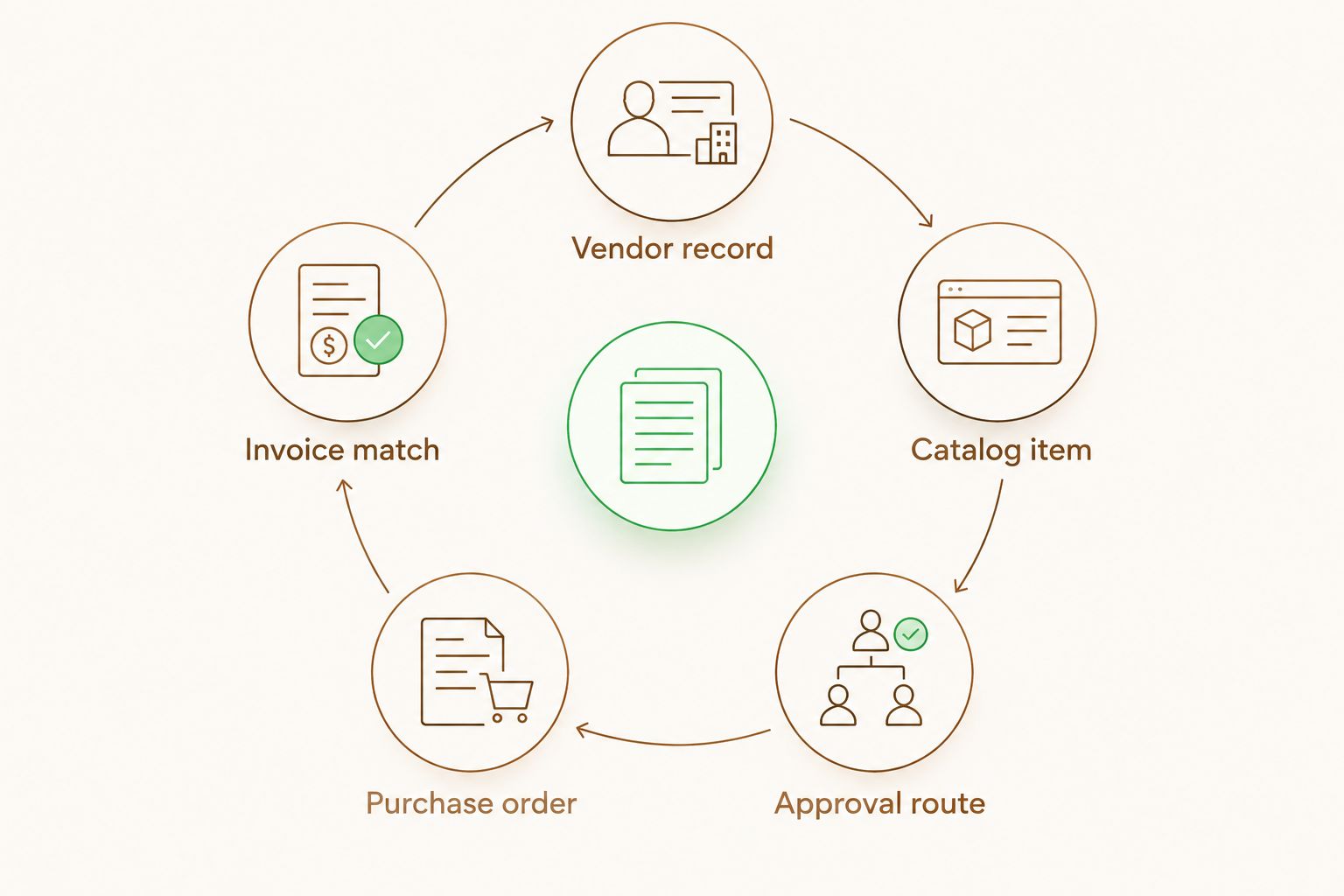
Expected result: An authorized requester can find the approved candle item without retyping supplier or accounting details.
Compare the bundle options
If the corporate program includes both a candle and a portable fragrance format, keep each bundle as a distinct catalog item. The supplied product descriptions identify a 10 ml rollerball in every option below.
| Product | Best for | Included scent direction | Procurement consideration |
|---|---|---|---|
| Dolce Far Niente Rollerball + Candle Bundle | Teams choosing rose and sandalwood | A 10 ml rollerball with rose and sandalwood in a jojoba and vitamin E base, plus a candle | Confirm recipient fragrance preferences before committing to one scent |
| Scent of Nirvana Rollerball + Candle Bundle | Programs choosing oudh and woods | A 10 ml rollerball with oudh, patchouli, and cedarwood in a jojoba and vitamin E base, plus a candle | The distinct scent profile will not suit every recipient |
| Nidra Rollerball + Candle Bundle | Programs choosing jasmine and soft musks | A 10 ml rollerball with jasmine and soft musks in a jojoba and vitamin E base, plus a candle | Avoid presenting the fragrance as a treatment for sleep or anxiety |
These options support different fragrance preferences; none is universally best. For a broad recipient list, give the buyer a controlled choice where operations permit it. For a fixed campaign, approve one option and document who made the scent decision.


Route the requisition and purchase order
- Start a Requisition from the approved catalog item rather than a free-text request.
- Enter the Quantity, Need-By Date, Ship-To Location, Cost Center, and Business Purpose.
- Attach the approved recipient file through your organization's protected transfer method. Do not paste personal addresses into an open comment field.
- Route the request to the Budget Owner and any procurement or brand approvers required by policy.
- Convert the approved requisition into a Purchase Order.
- Send the purchase order through the approved supplier channel and retain the acknowledgment with the order record.
Custom corporate branding or packaging needs its own proof checkpoint. Attach the approved proof to the purchase order, identify the employee authorized to approve revisions, and prevent informal email changes after approval.
Expected result: The supplier receives one authorized document defining the items, quantities, delivery instructions, and approved specifications for the 2026 order.
Create the recurring-order variant
Use a blanket purchase order when the same approved products support repeated employee, client, or event gifting.
- Select Blanket Purchase Order or the equivalent document type in your system.
- Define the approved product scope, responsible department, ordering period, and maximum authorized commitment.
- Require each release to include a campaign, recipient group, or event reference.
- Route releases through the lighter approval path allowed by your policy while preserving the original accounting code.
- Reconcile every release separately so procurement can trace individual shipments back to the blanket order.
- Close the blanket order when its period ends or its approved commitment is exhausted.
Do not use one blanket order as an unrestricted gift account. Restrict it to approved Caftari corporate candle products, named requesters, and a defined business purpose.
Expected result: Repeat orders no longer require full supplier onboarding, but every release remains attributable to an approver and cost center.
Match invoices and receipts
Record receipt by the same unit used on the purchase order. If the purchase order lists bundles, the receipt should not convert them into separate candles and rollerballs.
- Confirm that the invoice carries the correct Purchase Order Number.
- Compare Supplier SKU, Quantity, Unit of Measure, and agreed line amount with the purchase order.
- Match the receipt or delivery confirmation to the invoiced quantity.
- Route genuine exceptions to the buyer instead of editing the purchase order solely to force a match.
- Preserve the invoice, receipt, approval history, and supplier communication according to your retention policy.
Organizations with separate invoicing platforms should decide who owns submission and exception handling before the first recurring order. Outsourced e-invoice submission changes who transmits invoice data, but it does not remove the buyer's responsibility to maintain accurate purchase-order and receipt records.
Expected result: Accounts payable can connect the invoice to an authorized order and documented receipt without asking the requester to reconstruct the purchase by email.
Troubleshooting
The supplier request stays pending
Compare the legal name and tax information in the supplier record with the submitted documents. Then check whether procurement assigned an owner and whether every required attachment reached the approval queue.
The catalog item cannot be selected
Confirm that the item is active, assigned to the requester's business unit, and valid for the intended ship-to location. A correct SKU can still remain hidden when catalog permissions are incomplete.
The invoice fails matching
Check the SKU and unit of measure first. A bundle recorded as several individual items creates a quantity mismatch even when the delivered contents are correct. Correct the underlying catalog or purchasing record through the approved exception process.
Custom packaging differs from the proof
Pause receipt approval and compare the delivered order with the proof attached to the purchase order. Keep the issue tied to the affected purchase-order line so unrelated items can follow the normal process.
Recipient information appears in comments
Remove access according to your privacy procedure and move the data to the approved protected channel. Limit the procurement record to an order reference unless your policy explicitly permits personal delivery data there.
Customize your workflow
Once the core process works, add request forms for common use cases such as employee onboarding, client milestones, real estate closings, and professional-services gifts. Keep the supplier and item records stable while changing the campaign code, recipient file, approval owner, and delivery instructions.
A 2026 reporting view should connect requested quantities, purchase-order releases, receipts, invoice exceptions, and the requesting department. Do not use wellness claims as a procurement KPI. Fragrance can be designed for a calming ritual, but Caftari candles must not be presented as diagnosing, treating, curing, or preventing anxiety, insomnia, sleep disorders, or another medical condition.
FAQ
How does bulk corporate candle ordering procurement work in 2026?
Create an approved supplier record, add fixed candle or gift-set items to the catalog, route a requisition, issue a purchase order, and match the invoice to the receipt. Reuse the same records for repeat orders instead of rebuilding the request by email.
Should corporate candles use a standard or blanket purchase order?
Use a standard purchase order for a defined one-time event and a blanket purchase order for recurring approved orders. The blanket order still needs a product scope, responsible department, authorized commitment, and end point.
What information belongs in a corporate candle catalog item?
Record the supplier SKU, exact item description, unit of measure, commodity code, accounting assignment, and approved specifications. Keep recipient data and campaign-specific messages outside the permanent item description.
Can Caftari support a controlled corporate gifting workflow?
Caftari's candles, perfume oils, ready-made gift sets, and custom corporate branding or packaging can be represented as controlled procurement items. Buyers must still confirm the final specifications and supplier documentation required by their organization.
Why does a candle invoice fail purchase-order matching?
The most common process issue is a difference in SKU, quantity, or unit of measure between the purchase order, receipt, and invoice. Record a complete bundle as a bundle throughout the workflow instead of splitting it at receipt.
How should procurement handle recipient addresses?
Transfer recipient addresses through the protected method approved by your organization's privacy policy. Avoid putting personal delivery information in open requisition comments or reusable catalog descriptions.
Do corporate candle orders need a direct procurement integration?
Not necessarily. An internal catalog and purchase-order workflow can control repeated orders without a direct technical connection, while a punchout or API connection requires confirmed support from both systems.
Can corporate candles be described as treating sleep or anxiety?
No. Fragrance may be framed as part of a calming ritual, but corporate materials should not claim that a candle diagnoses, treats, cures, or prevents anxiety, insomnia, sleep disorders, or any medical condition.
One last thing
Store personalization instructions with the purchase-order line, not in the permanent supplier name or generic catalog title. That small separation keeps the 2026 catalog reusable while preserving a clear approval trail for each campaign.


