

Every new patient who books at your practice is also a new relationship, and most offices still let that first impression happen by accident: a form, a confirmation email, silence until the appointment. Instead of manually flagging new bookings and mailing a gift when someone remembers to, connect your scheduling trigger to an automated gift order so a welcome gift ships the moment a new patient books, with zero manual lookup.
- New patient welcome gift automation triggers a Caftari gift order the moment a new-patient appointment is booked, no manual entry.
- Works with any scheduling tool that fires a webhook or connects to Zapier, including most dental and medical practice platforms.
- The Caftari Signature Gift Set is a common default pick for a calming, low-scent-sensitivity welcome gift in 2026.
- Address and intake-form validation before the trigger fires prevents the most common failure: a gift order with no shipping address.
Why this matters
A welcome gift only works as a welcome gift if it arrives before or around the first visit, not three weeks later. Manual gifting programs slip because whoever is supposed to "remember to order something" is also answering phones, confirming insurance, and running the front desk. In 2026, most scheduling and practice management platforms already emit a clean "new appointment" event you can route with an automation tool like Zapier or Make, which means the gift step no longer depends on a person's memory.
This matters more for medical and dental offices than for most retail contexts because the first appointment often carries some anxiety for the patient. A calm, unscented-adjacent or lightly scented gift set framed around relaxation rather than luxury fits that moment better than a generic promotional item. Non-toxic candles for dental and medical offices covers scent-sensitivity considerations if your waiting room or gift choice needs to account for patients with fragrance sensitivities.
Before you start
- A scheduling tool with a trigger or webhook. Most practice management platforms (patient scheduling software, a booking calendar, or a CRM with appointment tracking) support a "new appointment created" event, either natively in Zapier or through a webhook you connect manually.
- A way to filter new vs. returning patients. Not every scheduling system tags this cleanly. If yours doesn't, you'll need a field (a patient-type dropdown, a "first visit" checkbox on the intake form, or a lookup against your existing patient list) that the automation can check before it fires the gift order.
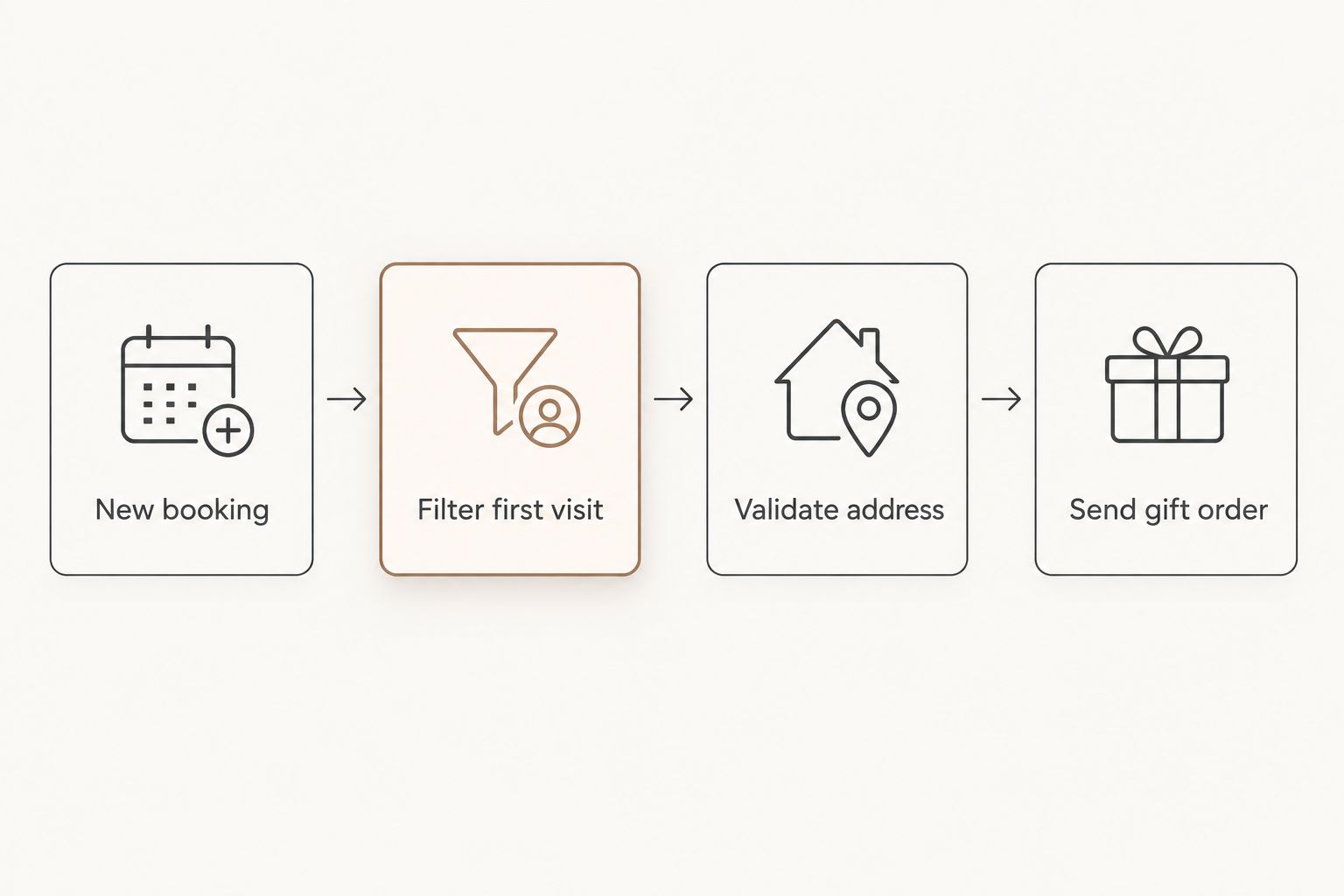
- The gotcha that bites at step four: if the booking trigger fires before the intake form captures a shipping address, the gift order will be missing the one field it actually needs. Build the address check into the trigger, not after it, or every incomplete booking becomes a stalled order sitting in a queue nobody checks.
Set up your booking trigger
- In your automation platform, create a new workflow (Zapier calls this a Zap, Make calls it a scenario) and choose your scheduling tool as the trigger app.
- Select the trigger event New Appointment or Appointment Created — the exact label depends on your platform, but look for anything tied to a booking being confirmed rather than just scheduled.
- Add a filter step immediately after the trigger. Set the condition to check your "new patient" field equals true, or First Visit equals Yes, depending on how your intake form labels it.
- Test the trigger with a real test booking and confirm the filter correctly separates new patients from returning ones before moving on.
Expected result: the workflow only continues past this point for bookings tagged as a first visit — a returning patient's rebooking should not trigger a second gift.
Configure the gift order action
- Add an action step after your filter and connect it to your order or fulfillment tool — this is typically a Shopify draft order action if you're ordering directly from a gift retailer's storefront, or a form-submission step if your fulfillment process runs through a spreadsheet or a gifting coordinator.
- Set the Product field to the gift set you're standardizing on for new patients. Many practices default to one set for simplicity rather than letting the choice vary booking to booking.
- Map the Shipping Address field directly from the intake form fields captured at booking, never from a manual entry field, to avoid the address gap covered above.
- Set a Send Date or delay if you want the gift to arrive a day or two before the appointment rather than the same day it's booked — for a first-visit gift, arriving ahead of the appointment reads as more considered than arriving after.
Expected result: a gift order is created automatically with the correct address and product every time a new-patient booking clears the filter, with no manual data entry.
Map patient and appointment data fields
- Confirm your intake form or booking form captures First Name, Shipping Address, and Appointment Date as separate, cleanly labeled fields — automations break most often on messy or combined fields.
- If your gift includes a personalized note, map the First Name field into the note-field of your fulfillment step so the note reads naturally rather than pulling a full patient record.
- Avoid mapping any clinical or health-related fields from the intake form into the gifting workflow. The gift automation only needs contact and shipping data, not treatment notes, insurance details, or health history — keep those systems separate.
Expected result: the gift order carries only the contact information it needs, and nothing from the patient's clinical record crosses into a gifting or marketing tool.
Second variant: send a gift on patient re-activation
A close variant of this workflow covers lapsed patients returning after a gap — a recall gift rather than a welcome gift. Instead of filtering on "first visit," filter on Last Appointment Date being more than a set number of months in the past, then route to the same gift order action with a different note template ("welcome back" instead of "welcome"). This reuses almost the entire setup above and only changes the filter condition and the note copy. Practices running both workflows should use two separate automations rather than one with nested conditions — nested logic is where these builds tend to break during troubleshooting.
Corporate and B2B gifting programs use a nearly identical structure. If your practice already sends gifts tied to other events — a signed engagement letter, a closed referral, an employee milestone — the setup pattern in connecting corporate gifting to your HR onboarding workflow maps directly onto this one, swapping the trigger app for whatever system fires the event.
Troubleshooting
- Gift orders fire for returning patients too. The filter step is checking the wrong field, or your scheduling tool doesn't reliably tag first visits — add a manual override field on the intake form as a backup check.
- Orders sit incomplete with no address. The trigger fired before the intake form was submitted. Move the trigger to fire on Form Submitted instead of Appointment Created, or add a wait step until the address field is populated.
- Duplicate gifts on rescheduled appointments. Most scheduling tools fire a new event on reschedule, not just on creation. Add a filter checking whether this is the patient's first-ever trigger, not just first appointment, using a lookup against a patient ID rather than the appointment record alone.
- Clinical data leaking into the gifting tool. If your intake form is one long form, some fields you don't intend to map still show up as available. Explicitly select only the fields you need in each mapping step rather than mapping "all fields."
- Gift arrives after the second appointment. Check your Send Date delay setting — a delay meant to buffer against same-day bookings can stack incorrectly if the trigger itself was already delayed by a form-submission wait step.
“If the gift arrives after the second appointment, it isn't a welcome gift anymore — it's a follow-up.”
Customize your workflow
Once the base automation runs cleanly, most practices extend it in a few directions: swapping the gift by season, adding a second gift tier for referred patients, or routing bulk orders through procurement instead of one-at-a-time fulfillment once volume passes a few dozen bookings a month. Connecting bulk candle orders to your procurement system covers the switch from one-off orders to a standing bulk arrangement, which is usually the next step once this workflow is running reliably.
For the gift itself, the Caftari Signature Gift Set is a common default for this exact use case: three scents in one set, designed as a calming ritual rather than a single strong fragrance, which works well when you don't know a new patient's scent preferences ahead of time.
FAQ
What is new patient welcome gift automation?
It's a workflow that connects your scheduling tool's new-appointment trigger to a gift order, so a welcome gift ships automatically when a new patient books, without manual data entry.
Do I need Zapier to build this?
Zapier is the most common tool for this in 2026, but any automation platform that connects your scheduling software to an order or form action works, including Make and native webhook integrations.
How do I avoid sending a gift to returning patients?
Filter the trigger on a first-visit field from your intake form or scheduling tool before the gift order action runs, and back it up with a manual override field in case the automatic tag is wrong.
Should the gift arrive before or after the first appointment?
Before it, ideally a day or two ahead. A gift that arrives after the visit reads as an afterthought rather than a welcome.
Is it safe to connect patient scheduling data to a gifting automation?
Map only contact and shipping fields into the gifting workflow, and exclude clinical or health-record fields entirely — the gift automation never needs treatment data.
What gift works for a new patient with unknown scent preferences?
A multi-scent set removes the guesswork since it doesn't commit to one strong fragrance; the Caftari Signature Gift Set is built around that idea with three scents in one package.
Can this same setup handle recall or reactivation gifts?
Yes — swap the first-visit filter for a last-appointment-date condition and reuse the same gift order action with different note copy.
What breaks this automation most often?
Missing shipping addresses at the moment the trigger fires is the most common failure; triggering on form submission instead of appointment creation usually fixes it.
One last thing
The part of this workflow practices skip most often isn't the trigger or the gift — it's the address validation step. Skip it and the automation runs fine in testing, then quietly fails on real bookings the first time someone books without finishing the intake form, which in a busy practice in 2026 is more often than not.


